
Setup on the Sales Channel
There are a few FBA-specific settings that must be configured in order to properly use CSM for Amazon’s FBA inventory management features.
-
Search for CSM Sales Channels and select the related link
- Select your Amazon FBA Sales Channel
-
Order Management FastTab
-
Inventory Location: enter the location that represents Amazon's fulfillment network. This is an aggregated location; Amazon's logistics determine the actual fulfillment center for each shipment.
-
-
Listing Management FastTab
-
Inventory Ship Plan Number Series: enter a number series for FBA shipping plans. CSM assigns the next available number each time a new plan is created.
-
Default Replenishment Location: enter the warehouse location you ship inventory from. This will auto-populate as the ship-from location on new shipping plans. Leave blank if you replenish from multiple locations and prefer to set it per plan.
-
-
Amazon Seller and API Data FastTab
-
- Select your Amazon FBA Sales Channel
-
-
-
-
Fulfillment Network: confirm this is set to AFN. CSM uses this code to distinguish FBA channels from other Amazon services.
- API Engine Execution Module: ensure this is set to AMAZON
-
-
-
Package/Carton Templates
Package templates define the box and pallet dimensions used for case-packed shipments. They must be configured before creating shipping plans.
-
Search for CSM Setup and select the related link
- Select Related > Package/Carton Templates
-
-
- Add a record for each carton size used for items sent to Amazon. Ensure you check off the Can Contain Items checkbox if it applies. Pallet skids can also be defined here.
- This Package Template will be utilized later on when we create an Inventory Plan.
-
CSM Listings
Each item you want to replenish through FBA needs a CSM Listing record linked to your FBA Sales Channel. If your Amazon store already has SKUs, import them rather than creating Listings manually:
-
Search for CSM Amazon Reports and select the related link
- Select Actions > Request New Report > Merchant Listing All Data
- When the report appears and you see the identifier in the Report Id column, select your FBA Sales Channel Code
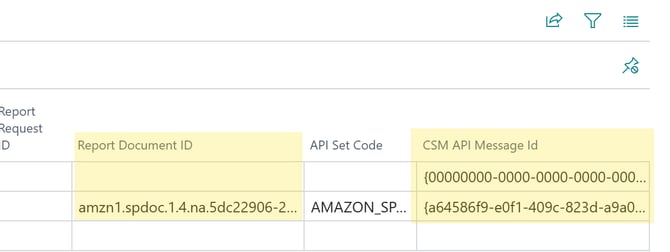
- Select Home > Refresh to populate the Report Type and Report Document ID - you should see the Report Document ID and CSM API Message Id fields populate
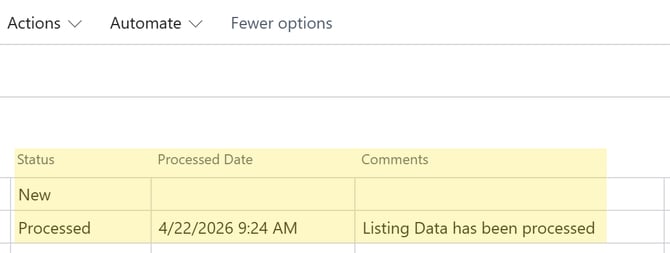
- Select Report Processing > Process Listing Report to generate Listings in CSM - you should see the Status, Processed Date and Comments fields populate
- Select Actions > Request New Report > Merchant Listing All Data
- Search for CSM Sales Channels and select the related link
- Select Listing > Channel Listings where you can then select the record you'd like to modify.
- It is very important to have some specific fields filled out/optimized before you submit items for replenishment. We will go over two of these important sections on the CSM Listing card as it pertains to FBA:
-
-
- General FastTab
-
-
-
-
- Channel Item SKU: this is the SKU # you have on Amazon. It is critical for this item to be loaded onto Amazon's Inventory system as an FBA item. If you have the item listed as FBM, the integration will experience errors. Required.
- No. : BC Item number. Required.
- Variant Code: only required if the SKU maps to a specific variant.
- Unit of Measure: the item's selling unit of measure. Required.
- Amazon Product Information FastTab
- General Product Information:
- Product Name: this should be automatically populated if the listing was retrieved using CSM Amazon Reports.
- ASIN: automatically retrieved from Amazon. If blank, this will need to be manually populated with the SKU's ASIN. Required.
- fnSKU (Fulfillment Network Stock Keeping Unit): auto-populated if retrieved via CSM Amazon Reports.
- Amazon Product FBA Shipping
- Base Unit of Measure: Required.
- Always Case Packed: must be toggled to enabled for FBA replenishment. Required.
- Inventory Movement UOM: the case pack unit of measure. Required.
- Case Packed Pref Package Template: select the matching carton template. Required.
- Media: must be enabled if the item is a type of media.
- Case Packed Weight Units: measurement being used for the item weight (pounds/kilograms). Required.
- Case Packed Weight: enter the weight of the case pack. Required.
- Expiration Date Duration: if an item has an expiration date, specify a duration (period of time) from the date of the shipment. Leave blank if there is no expiration date.
- Preparation Owner: refers to the entity (you or Amazon) that handles tasks like bagging, bubble wrapping, or bundling products.
- Label Owner: refers to the entity who applies the scannable barcode labels.
- General Product Information:
-
-