
We built CSM as a fully integrated, feature-rich application embedded within Business Central, connecting your ERP directly to the Marketplace or eCommerce platform of your choice.
We currently have integrations built to connect Business Central with: Amazon, Walmart, Shopify, BigCommerce, WooCommerce and Magento/Adobe.
Our core focus is Order Management and Listings Management to manage orders and listings across these platforms. Some platforms have addon products to further extend your connection.
These types of integrations are detailed and there are many moving pieces. Due to security and privacy reasons, the methodology to connect Business Central to these platforms is technical and complex. While some of our initial integrations (Walmart, BigCommerce) can be done in just a few clicks, some of them require more in-depth steps, but know that we're constantly working on improving the process.
Note: We have four areas of key Terms/Concepts that we will reference in much of our subsequent documentation:
(while this is quite technical, understanding these terms will help make the onboarding guides easier to understand)
BC Navigation | API Terms | CSM Extensions | CSM Specific Terms
Business Central Navigation
As we guide you through our self-service install and setup, we will often refer to accessing BC or CSM cards, data and settings. Here is a quick overview of the terms we'll be using. If you are a seasoned Business Central power user, you may already know all of this information.
- Search / Magnifying Glass button (ALT+Q) - when we give instructions to search for a particular Card (or an installed application extension), this is where you start. Simply click on the magnifying glass button (or type the ALT+Q shortcut), enter in your search terms and click the related link.
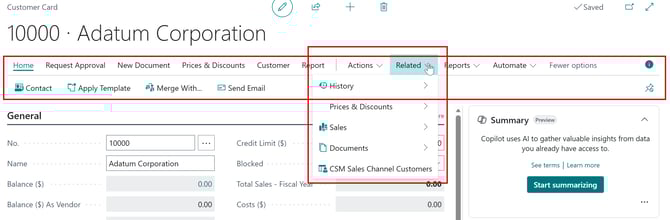
- Navigation Ribbon / Actions - once you've loaded your card/extension, you will have a navigation ribbon at the top which has several categories of options, including drop-down menus. Directly below that main navigation ribbon is an action bar with buttons.
- FastTab - this is what BC calls a section header in a particular card. Here is an example showing the Address & Contact FastTab for the Customer Card
- FactBox - this refers to a panel on the right side of the screen that shows related information without needing to click to another screen. We're using the same customer card from above to show you the example below:



General API Terms
API
- The term API means Application Programming Interface. An API is a set of rules or protocols that enables software applications to communicate with each other to exchange data, features and functionality.
Endpoint
- When described alongside APIs, an Endpoint is a destination (usually a website URL) that a source set of API code connects to and passes data and instructions through that address.
Scopes
- Scopes in an API connection refer to types or categories of functions that are permitted to be used within the API connection.
Client ID, Client Secret and Token
- Client ID, Client Secret, and Token are permission-based values that authorize your API calls and grant the connected systems access to each other. They are all progressively more private/critical than the prior.
CSM Extensions Defined
CSM Core
- This contains the core functionality of the CSM solution, such as the tables in which data is stored, the API engine that processes the API calls used to send and receive data between an eCommerce channel and Dynamics 365 Business Central, and the automation routines that execute these API calls.
CSM for [platform]
- This facilitates communication between CSM Core and an external environment.
Suite Engine Variations Library
- If you are working with items that are available in multiple variations (for example, color or size), this extension allows you to define this structure within Business Central. It is included as part of CSM to support online retailers that sell configurable items.
Suite Engine Common Base
- This is used to manage your subscription to CSM and other Suite Engine products.
CSM Specific Terms
API Sets
-
You can consider the API Set as a master container to hold a set of API Credentials
-
Search for API Sets and select the related link
-
API Sets have a unique identifier called an API Set Code
-
You can have unlimited API Sets in CSM
API Credentials
-
API Credentials live inside of a particular API Set
- API Credentials contain key items to connect to an Endpoint, such as: Scopes, Client ID, Client Secret and Token
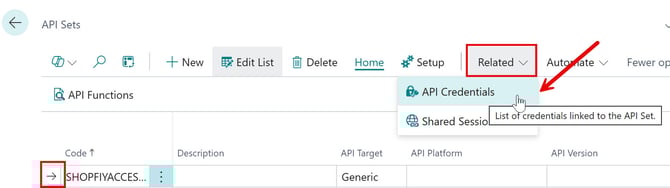
- You can access your API Credentials inside of the API Sets card by selecting your API Set and under the Related option, select API Credentials and then click the API Set Code
Sales Channel
-
We use the term Sales Channel to describe the core configuration that represents the connection between Business Central and your hosted Marketplace or eCommerce platform
- You can access your Sales Channels by searching CSM Sales Channels and selecting the related link
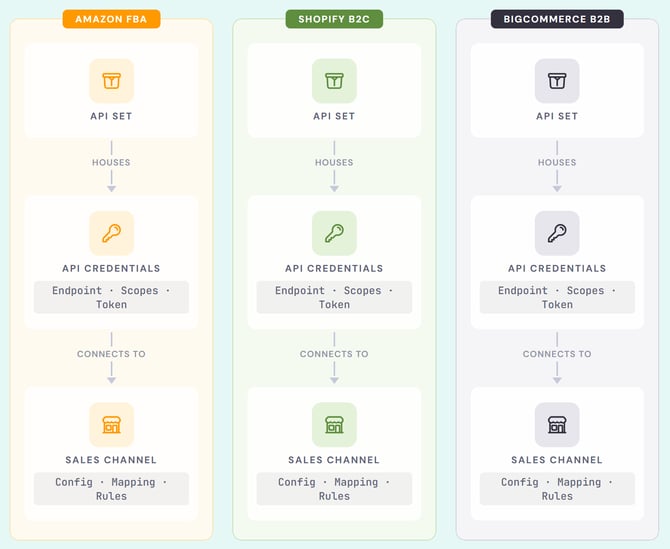
- Sales Channels contain unique configuration rules, customer mapping, and item mapping. Example: you could set up a Sales Channel for Amazon FBA, one for Shopify B2C and another one for BigCommerce B2B
- You can have unlimited Sales Channels in CSM
Note: This is the relational architecture of CSM:
API Sets house the API Credentials
API Credentials connect Business Central to your Marketplace / eCommerce platform
Business Central's configuration settings to your Marketplace / eCommerce platform are found in the Sales Channel.
➡️ Next Step: Installation