Lot Ledger Entries
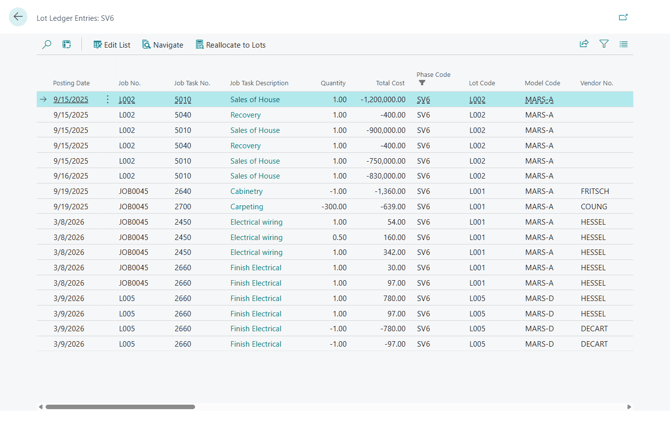
- Opens the page "Lot Ledger Entries: <Phase Code>", showing the entries posted against every Lot in the Phase — the posted history behind budget-to-actual reporting.
- The grid contains "Posting Date", "Job Task Description", "Quantity", "Total Cost", "Vendor No.", "Vendor Name", "Vendor Contract No.", "Vendor WO No.", "Type" ('Item' or 'G/L Account'), "No.", "Description", "Source Code", "Job Planning Line No.", "Cost Group Code", "Cost Detail Code", "Phase Code", and "Lot Code".
- The page has the following actions:
- Navigate — standard Business Central action showing all entries created by the same posting.
- Reallocate to Lots — redistributes the cost on the selected entries across a chosen set of Lots, typically to spread a Phase-level or general cost onto the Lots it belongs to.
- The action opens the page "Reallocate Costs to Lots: <Phase Code>".
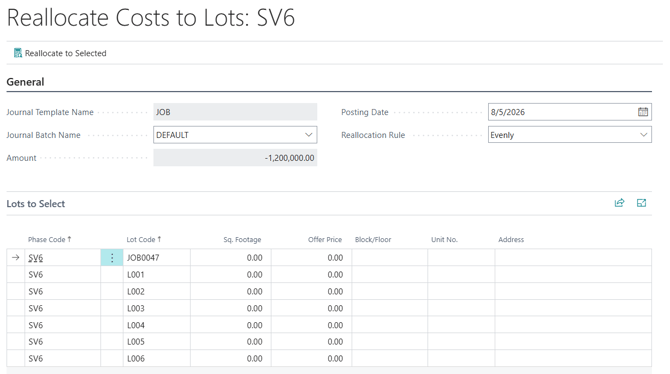
- On FastTab "General", "Journal Template Name" and "Amount" are filled in from the selected entries and cannot be changed. Select the "Journal Batch Name", the "Posting Date", and the "Reallocation Rule" that determines how the amount is split — for example 'Evenly'.
- In the grid "Lots to Select", choose the destination Lots. The grid shows "Phase Code", "Lot Code", "Sq. Footage", "Offer Price", "Block/Floor", "Unit No.", and "Address" to help identify them.
- To complete the action, click "Reallocate to Selected".